This is the multi-page printable view of this section.
Click here to print.
Return to the regular view of this page.
Game Concept
A description how the game that is played in the Microservice Dungeon works - its rules, mechanics, and goals.
The following section provides an overview of the overall concepts of the Microservice Dungeon.
tl;dr
The Microservice Dungeon (short MSD) is a game where players compete against each other
to achieve the highest possible score. Each player service controls a swarm of robots.
Robots move across the game board, mine resources, purchase upgrades, and battle each other.
All of these actions earn points for the player.
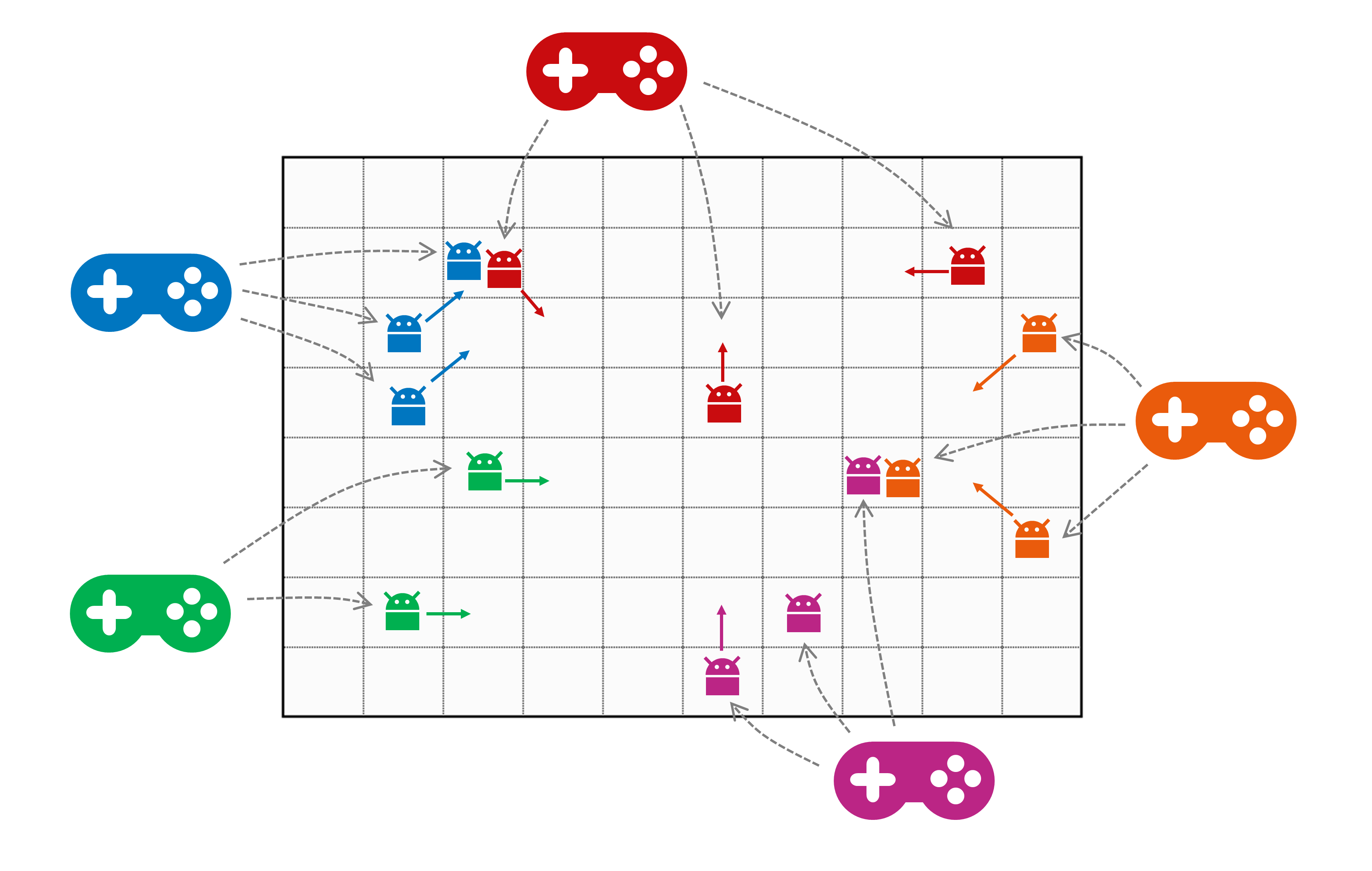
The notable difference to a “regular” multiplayer game is that the players are not persons but
microservices, implemented by a developer (or developer team). The robot swarm is usually not controlled
manually but by an algorithm implemented in the player service.
The map is a 2-dimensional grid of planets. Resources are distributed across it. They can be mined,
picked up by robots, and sold at space stations. Space stations are also placed on the map and serve as a
kind of home base and safe zone. There, robots can sell resources, get repairs, and purchase upgrades.
Combat is not allowed on space stations.
Each player has a money account, and starts the game with an initial amount of money. This can be used to purchase new
robots. New robots always start at the player’s allocated space station. Selling resources and killing robots
increases a player’s account balance. With more money, a player can buy additional robots or upgrade existing ones.
In the next subsections, we will look deeper into the rules for several aspects of the game.
1 - What is a map in MSD?
A map is basically a 2-dimensional grid, structured like below. Each tile can be of a
specific type, and can be identified (relative to the overall map) by
an integer tuple, starting at (0,0) in the lower left corner.

Robots can move over the map in the directions N, NE, E, SE, S, SW, W, and NW (see below). The map boundaries
limit the movements. I.e. from tile (0,2) you can only move in northern, eastern, and southern direction,
but not to the west.


Summarized, the tiles in a 2-dimensional MSD map follow this schema, which is then
explained in the subsequent sections.
map = { tile }
tile = planet | void
planet = space station | resource mine | black hole | empty
resource mine = bio matter | cryo gas | dark matter | ion dust | plasma cores
Planets and Voids
The tiles of a map represent either be a star system or a void. Planets are connected to each
other by hyperlanes. Robots can use these hyperlanes to travel from one planet to the next. Since
voids do not have hyperlanes, they are effectively barriers for robot movement. Robots need to navigate
around them, traveling from one planet to the next.

We will create an example map, step by step, to illustrate the map concepts. The image above shows our
example map with some barriers on it, on the following tiles:
- (1,1)…(1,4)
- (3,6)…(3,7)
- (7,4)
- (4,3)
- (7,0)…(7,1)
Gravity Areas
Traveling hyperlanes requires energy. The robots have a limited supply of energy, which they need
to recharge eventually. An MSD map can have areas with different levels of gravity. Depending on
that level of gravity, passing a hyperlane from one planet to the next requires a certain
amount of energy (reference point is always the target planet).

The above image shows our map with a “typical” configuration of increasing gravity towards the center
of the map. Gravity comes in three levels:
| Gravity Level |
Energy needed (default) |
| LIGHT |
1 |
| MEDIUM |
2 |
| INTENSE |
3 |
Please be aware that the energy needed per level might be configured differently than the default
for each individual game. So you cannot rely on these values to be hardcoded.
Planet Types
Planets can have a resource mine or a space station, they can be a black hole, or they are just
empty. (For simplicity reasons, a planet - in the current version of this game - can only be one these
things. So it cannot be a resource mine and a space station at the same time. Neither will it have more than
one resource mine.
Any number of robots - both allied and enemy - can occupy the same planet. The image below shows our
example map “ready to play”.

Space Stations
A space station is a traversable tile that serves as both a trading outpost and a safe zone for robots.
Combat is not allowed on space stations. Robots can use space stations to trade, purchase upgrades,
and repair themselves. Some, but not all, space stations are able to spawn new robots. (Those who are able
to spawn robots are colored in blue in the sample map above. The others are just trading posts.)
Each player is assigned to a space station (of the type that can spawn robots, i.e. of the “blue” type), so
that new robots for the player fleet will always spawn at the same location. Depending on the number
of space stations, several players may share the same station.
Trading and upgrading is only possible at space stations. This means that a robot with its cargo area
full of mined resources must travel to a space station in order to sell the resources, and to get
upgrades. Space stations are neutral, and accessible to all robots from all players. I.e. robots can
travel to any space station, not only the one they spawned from.
Resource Mines
Some planets contain mines for resource extraction. Depending on the map type, they can randomly
distributed across the map, or deliberately located only in certain map parts. Each mine produces a
single type of resource, and will continue producing until it is depleted. Each planet can have at
most one resource mine.
There are five types
of resources, ranked from most common to rarest (hint: the further back the initial letter is in the
alphabet, the more valuable the resource.)
- Bio Matter
- Cryo Gas
- Dark Matter
- Ion Dust, and
- Plasma Cores
Our example map above shows a fairly small, but still typical distribution of resources. Bio matter
can be found in 8 locations, cryo gas in 5, dark matter in 3, and the most valuable ion dust and
plasma cores in 2, respectively. The numbers below the acronyms in the above map describe the available
units of the resource.
Once a mine is depleted, it is closed and disappears from the map. Depending on the particular map type
definition, new resources may be discovered once the existing units are partially or fully exhausted.
This discovery of new resources will not necessarily be at the same location as the old mine.
Mining takes time. A player service can ask for the mining process to start for a dedicated robot.
After a short delay, the resource becomes available on the planet ready to be picked up (by that
particular robot). This will happen automatically, assuming the robot is capable of doing so.
Robots are by default able to transport the least valuable resource in their cargo rooms
(bio matter). For all other resources, they need to be upgraded.
All resources are volatile substances. If the robot is not capable of holding the mined resource in
its cargo area, they remain at mine and evaporate - i.e. they are lost to both the player who
initiated the mining, and to all other players.
Black Holes
Black holes can be traversed by robots, but entering a black hole will - with
a certain probability - lead to the robot’s destruction. The default likelihood for destruction
is 50%, but this might be configured differently in a particular map.
Map Configuration
The map for an MSD game is configurable. There are a couple of standard map types, and it is possible to add
other types as well for dedicated games. Please refer to
the map definition guide for an in-depth
explanation of how to configure your own map for an MSD game.
2 - Robot Actions
(TBD: refine and discuss the robot actions in detail)
Every player controls a swarm of robots to compete against other players. A robot is exactly
what you’d expect — a mechanical unit with health points, energy for performing actions,
having the ability to move, engage in combat, and upgrade itself through the purchase
of upgrades.
Buying a Robot
Players can purchase new robots at any time during the game using their money. Newly bought robots spawn instantly at
a space station dedicated to a player.
Action-Cooldown / -Queue [to be discussed]
After performing an action, a robot requires a short pause before executing the next one. This cooldown applies
regardless of whether the action was successful or not. As a result, robots may not respond immediately to new commands.
Robots queue up actions and execute them in order. Players should carefully plan the number of commands they issue,
as each action has a different cooldown duration. For instance, attacking another robot has a shorter cooldown than
moving. Upgrades are available to reduce cooldown durations.
External actions do not trigger a cooldown, such as applying upgrades or collecting resources.
This mechanism is similar to the mining system, with one key difference: Robots execute actions immediately, followed
by a cooldown. Mines require processing time before yielding resources.
Energy
Robots have both health points and energy. Some actions consume energy, and if a robot runs out of energy, it pauses
and cannot perform further actions until it has recharged enough energy.
Energy automatically regenerates over time. This process is increased on space stations.
Repairing
Robots automatically restore health points over time on space stations. No action required.
Movement
Robots can move horizontally, vertically, and diagonally across the map. Each movement consumes energy and triggers
a cooldown. To track enemy robot positions, players must listen to the movements of other robots.
Fighting [to be discussed]
Robots can attack other robots. Attacks consume energy and trigger a cooldown, regardless of whether the attack is
successful or not. To attack, a robot must have enough energy and be in range of the target. Caution, friendly fire
is possible!
When an enemy robot is destroyed, the attacker becomes stronger, receives a financial reward and
collects the destroyed robot’s resources, regardless of its position.
Mining [to be discuessed]
To extract resources, a player starts the mining process at a specific mine. If the player’s robot is on the same
planet, it will automatically collect the resources once the mining process finishes.
Starting the mining process consumes energy and triggers a cooldown - even if the mining fails or the robot is
elsewhere. Collecting mined resources does not consume energy nor does it trigger a cooldown. But in order to work,
the robot must be present on the planet when the mining completes.
3 - Buying and Selling
(TBD: Explain the voucher concept, and structure the documentation a little bit more.)
Trading (buying and selling) is an essential part of the MSD and takes place at space stations.
Players can sell mined resources, purchase new robots, and upgrade existing ones
— all in exchange for in-game currency.
Selling Resources
Resources collected by robots can be sold at any space station.
To initiate a sale, a robot carrying resources must be present at a space station.
Once the sale is started, all resources on that robot are sold to the market,
and the player receives the corresponding amount of money in their account.
The value of each resource depends on its rarity. Currently, prices are hardcoded
and fix, but may fluctuate (based on market demand) in the future. In that case,
if a large volume of a specific resource is sold in a short time frame, its market price
will drop. Players should consider these fluctuations when planning their mining
and trading strategies.
Buying Robots
Players can purchase additional robots at any time during the game.
To do so, they must have sufficient funds in their account. New robots are delivered
to a space station. If the player does not specify a station, a random one will be chosen.
Purchases are made through robot vouchers, which define how many robots will be spawned.
Vouchers are immediately redeemed upon purchase.
Upgrading Robots
Robots can be upgraded to enhance their capabilities. Upgrades can improve:
- Carrying capacity
- Combat strength
- Attack damage
- Health points
- Health point regeneration speed
- Energy
- Energy regeneration speed
- Energy capacity
- Cooldown time
Upgrades are purchased in the form of vouchers, which are tied to a specific robot.
To apply an upgrade, the robot must be located at a space station.
If the robot is not at a station when the upgrade is purchased,
the voucher will be discarded without refund, and the player will be notified.
Debt
Player cannot go into debt. If they do not have enough money to make a purchase, the
transaction will be declined and an error message will be published.
4 - Running a Game
The MSD is played in individual games. To participate, players register once and join an open game. This is possible even
after the game has started, but late joiners do not receive any compensation for missed playtime. The number of
participants is limited and defined at game creation.
Game Flow
When a game starts, each player is assigned to a space station on the map. New robots for the player’s fleet will
always spawn at this location. Depending on the number of space stations, several players may share the same station.
Win Condition
A game ends either when an administrator intervenes, or when the predefined game time runs out. The player with the
most points wins the game, though there are several categories to score a ranking.
Once a player has joined a game, they cannot leave. If they lose all their robots and have no funds left to purchase
new ones, their game ends.
TBD: explain how a player can participate in a game, how a game is started, monitored and ended.