What is a Map in MSD?
A map is basically a 2-dimensional grid, structured like below. Each tile can be of a specific type, and can be identified (relative to the overall map) by an integer tuple, starting at (0,0) in the lower left corner.
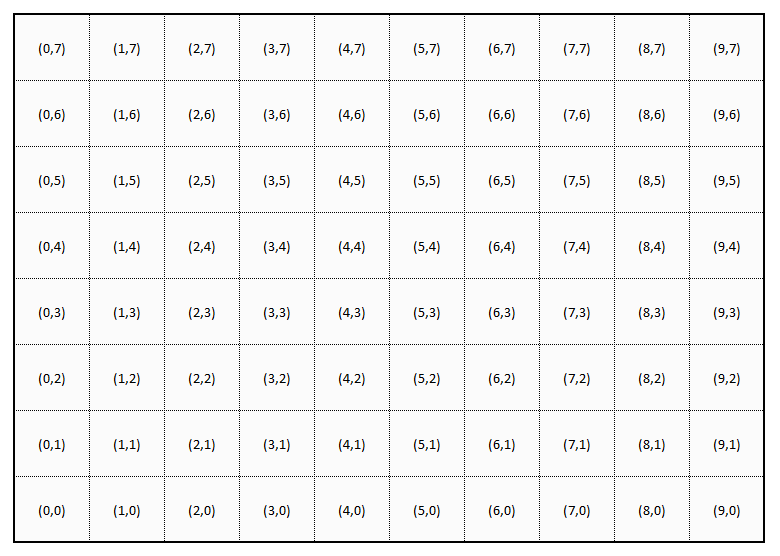
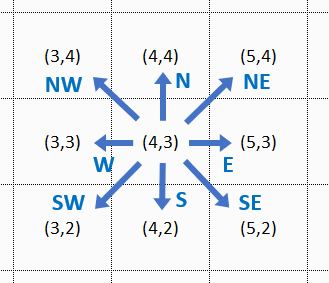
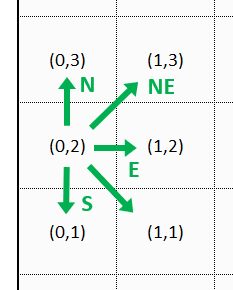
Robots can move over the map in the directions N, NE, E, SE, S, SW, W, and NW (see below). The map boundaries limit the movements. For example, from tile (0,2) you can only move in northern, eastern, and southern directions, but not to the west.
In summary, the tiles in a 2-dimensional MSD map follow this schema1, which is then explained in the subsequent sections.
map = { tile }
tile = planet | void
planet = space station | resource mine | black hole | empty
resource mine = bio matter | cryo gas | dark matter | ion dust | plasma cores
Planets and Voids
Each tile of a map is either a planet or a void. Planets are connected to each other by hyperlanes. Robots can use these hyperlanes to travel from one planet to the next. Since voids do not have hyperlanes, they are effectively barriers for robot movement. Robots need to navigate around them, traveling from one planet to the next.

We will create an example map, step by step, to illustrate the map concepts. The image above shows our example map with some barriers on it, on the following tiles:
- (1,1)…(1,4)
- (3,6)…(3,7)
- (7,4)
- (4,3)
- (7,0)…(7,1)
Gravity Areas
Traveling hyperlanes requires energy. The robots have a limited supply of energy, which they need to recharge eventually. An MSD map can have areas with different levels of gravity. Depending on that level of gravity, passing a hyperlane from one planet to the next requires a certain amount of energy (reference point is always the target planet).
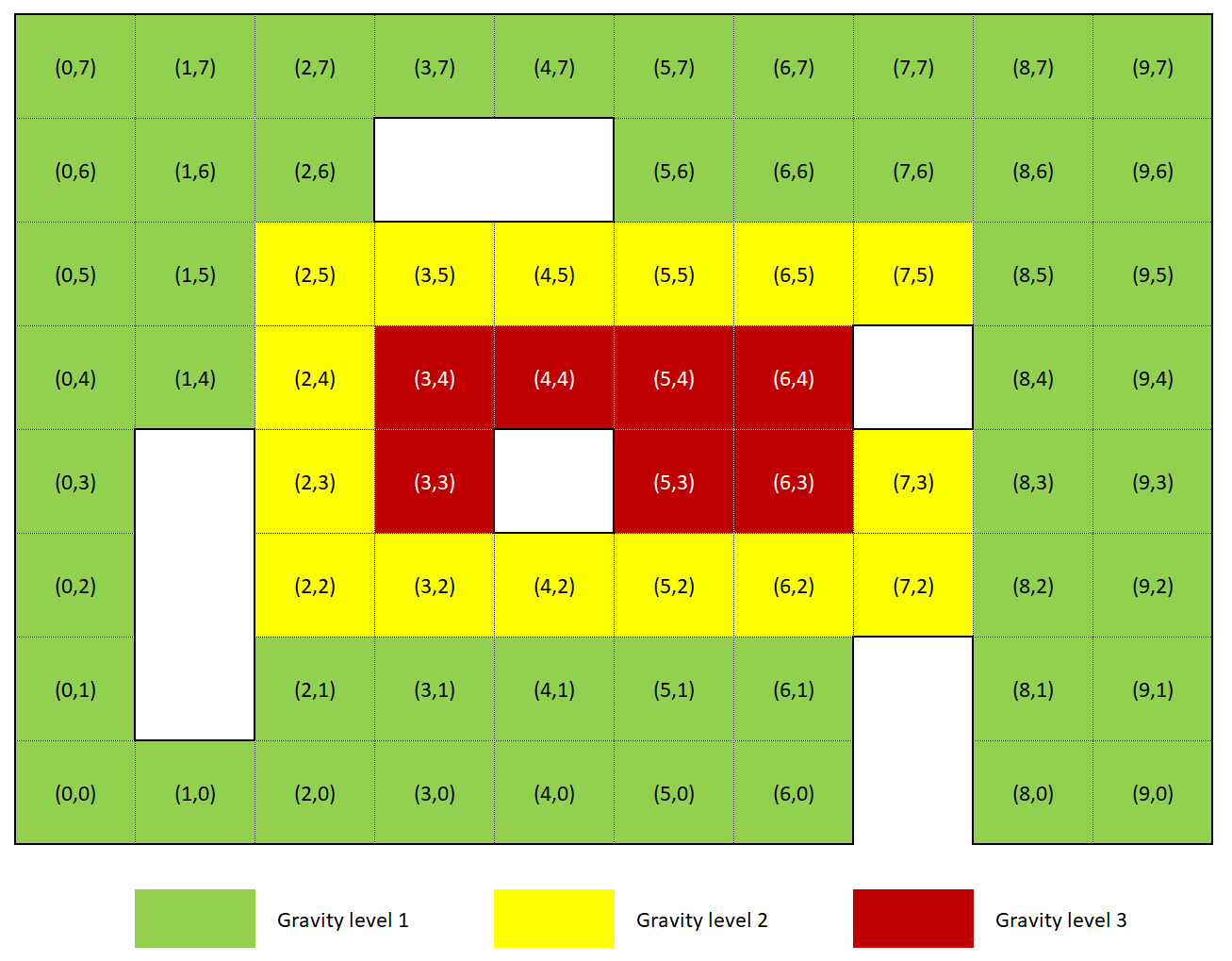
The above image shows our map with a “typical” configuration of increasing gravity towards the center of the map. Gravity comes in three levels:
| Gravity Level | Energy needed (default) |
|---|---|
| LIGHT | 1 |
| MEDIUM | 2 |
| INTENSE | 3 |
Please be aware that the energy needed per level might be configured differently than the default for each individual game. So you cannot rely on these values to be hardcoded.
Planet Types
Planets can have a resource mine or a space station, they can be a black hole, or they are just empty. (For simplicity reasons, a planet - in the current version of this game - can only be one of these things. So it cannot be a resource mine and a space station at the same time. Neither will it have more than one resource mine.)
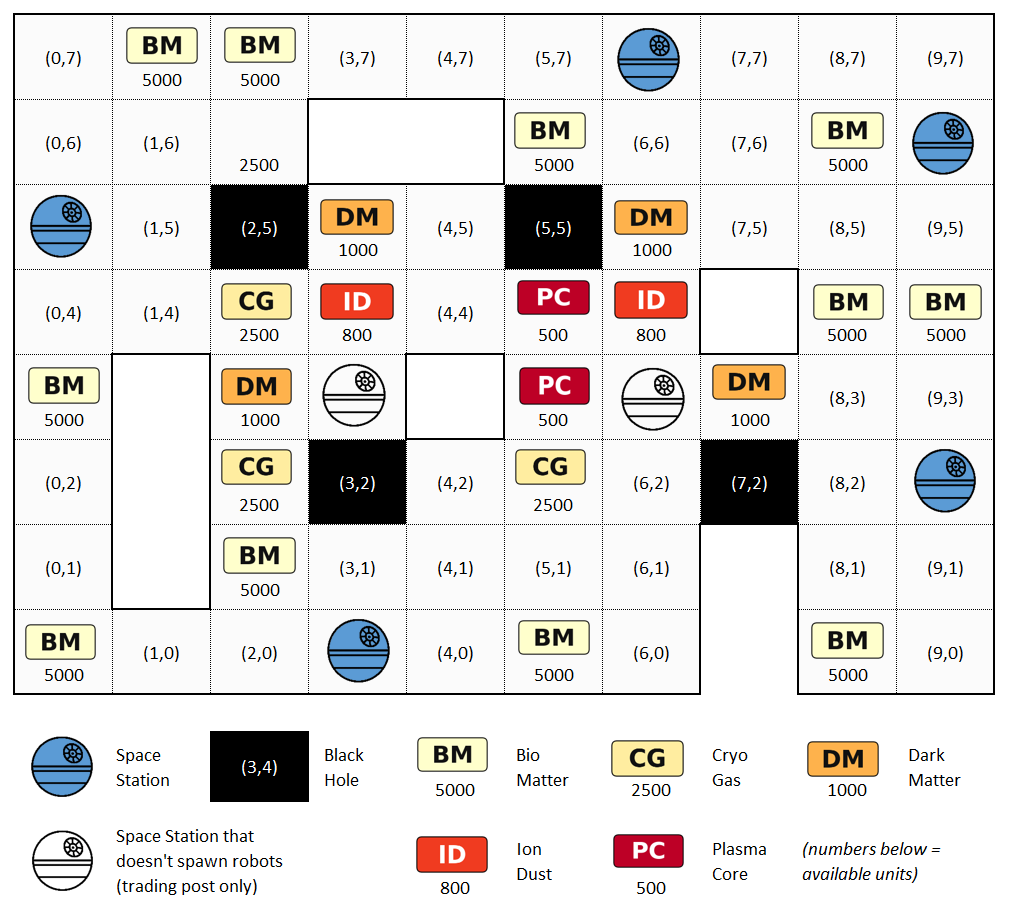
Any number of robots - both allied and enemy - can occupy the same planet. The image below shows our example map “ready to play”.
Space Stations
A space station is located on a planet, and serves as both a trading outpost and a safe zone for robots. Combat is not allowed on space stations. Robots can use space stations to trade and purchase upgrades, and they regenerate faster there. Some, but not all, space stations are able to spawn new robots. (Those that are able to spawn robots are colored in blue in the sample map above. The others are just trading posts.)
Each player is assigned to a space station (of the type that can spawn robots, i.e. of the “blue” type), so that new robots for the player fleet will always spawn at the same location. Depending on the number of space stations, several players may share the same station.
Trading and upgrading is only possible at space stations. This means that a robot with its cargo area full of mined resources must travel to a space station in order to sell the resources, and to get upgrades. Space stations are neutral, and accessible to all robots from all players. I.e. robots can travel to any space station, not only the one they spawned from.
Resource Mines
Some planets contain mines for resource extraction. Depending on the map type, they can be randomly distributed across the map, or deliberately located only in certain map parts. Each mine produces a single type of resource, and will continue producing until it is depleted. Each planet can have at most one resource mine.
There are five types of resources, ranked from most common to rarest (hint: the further back the initial letter is in the alphabet, the more valuable the resource.)
- Bio Matter (
bm) - Cryo Gas (
cg) - Dark Matter (
dm) - Ion Dust (
id), and - Plasma Cores (
pc)
Our example map above shows a fairly small, but still typical distribution of resources. Bio matter can be found in 11 locations, cryo gas in 3, dark matter in 4, and the most valuable ion dust and plasma cores in 2 each. The numbers below the acronyms in the above map describe the available units of the resource.
Once a mine is depleted, it is closed and disappears from the map. Depending on the particular map type definition, new resources may be discovered once the existing units are partially or fully exhausted. This discovery of new resources will not necessarily be at the same location as the old mine.
Mining is started by the player sending the corresponding intent to the planet — not to a robot. The intent names one of the player’s robots that is to collect the yield. The planet then starts the extraction, which takes time. Once it is completed, the named robot automatically picks up the excavated resource, provided it stands on the planet at that exact moment. No other robot can pick it up.
Only one mining operation can run on a planet at a time. A mining intent for a planet that is already being mined fails, whichever player sends it. In addition, each player has a cooldown per planet: after starting a mining operation on a planet, the player must wait before starting another one there.
All resources are volatile substances. If the named robot is not on the planet when mining completes, or is not capable of holding the mined resource, it remains at the mine and evaporates - i.e. it is lost to both the player who initiated the mining, and to all other players.
Black Holes
Black holes can be traversed by robots, but entering a black hole drains the robot’s health points. A robot whose health points are drained to zero is destroyed. How much health a black hole drains might be configured differently in a particular map.
Map Configuration
The map for an MSD game is configurable. There are a couple of standard map types, and it is possible to add other types as well for dedicated games. Please refer to the map definition guide for an in-depth explanation of how to configure your own map for an MSD game.
-
For the aficionados - this is supposed to be a dumbed-down Extended Backus-Naur Form (EBNF) :-) ↩︎